Motivation
Creating a good scientific poster increases the impact of the presented research. It catches attention and conveys the core idea of the paper to other people. Research presented with a good poster will stand out.
TLDR
- The design process starts with the content. To create an effective poster based on a scientific paper ruthless editing is required: 400 words or less should remain. To do this one must keep in mind who exactly the poster is for and with what purpose it is created. The poster should try to convey only one key message. Thus, it should be designed to optimally communicate this message. Everything else should be left out or put into separate documents e.g. a more detailed secondary poster or a handout.
- The layout of the poster should be as simple as possible to best convey the key message. It has to serve both as an illustrative visual backdrop for a presentation and as a stand-alone document. It has to appeal to visual and verbal learners. Maximization of the alignment of the contents makes it easy to quickly parse them. In choosing colours less is more. An appealing title block helps catch the attention of the potential audience.
- For the delivery of a poster presentation practicing lots is essential. This takes plenty of time. One has to be able to answer difficult questions, deal with a disruptive audience and other dynamics of the room while presenting the poster.
Introduction of Speaker
Mark Edwards is a fully trained graphic designer. This training equips him with the foundational principles of visual communication. He also co-founded and ran a marketing and graphic design business. During this time, he started teaching by offering evening courses for other business owners. He sold his company after 12 years to travel and experience different cultures for 3 years. After returning from his travels, he transitioned into the corporate world. For 15 years, he worked with renowned companies mostly in the pharmaceutical industry. He was employed to help researchers enhance the impact and reach of their scientific publications, conference presentations, and posters. He wasn't involved in the research itself but in optimizing how it was communicated to various audiences. Currently, he teaches these communication skills at universities. The lecture is based on this wealth of experience and provides insights into his well-honed approach to poster design.
Main Ideas
Mark Edwards' lecture focuses on the beginning stages of the presentation process, which include preparation, writing, design and images.
Preparation
In the beginning it is most important to consider the rules and logistics of the presentation. This includes reading the briefing by the organisers or even proactively reaching out to them in order to find out about the requirements for the poster. One has to know no in advance how big the poster is supposed to be, if there is a template, if there are restrictions on the content, etc.
One must also consider the logistics of transporting a physical poster and obtain a fitting container or finding a printing service nearby. Having a copy of the poster on an USB-stick is also advisable, in case the poster is damaged during transport.
For the delivery of a poster presentation practicing lots is essential. One should plan to spend a lot of time on this, to be able to answer difficult questions, deal with a disruptive audience and other dynamics of the room while presenting the poster.
Writing & Editing
The contents of the poster should be made clear first. According to Edwards, it is crucial to limit the writing on the poster to 400 words with an absolute maximum of 500 words. Anything more is too cluttered and thus detrimental to the readability and design of the poster. In order to truly focus on the most important aspects, one can consult the following framework. For an illustration refer to Figure 1.
Core Framework: The "Two Giants and a Golden Key"
- The Two Giants (Critical Questions): These two fundamental questions should be considered in-depth before any design work commences:
- Who (Audience Analysis & Targeting):
Edwards stressed that precise audience analysis is not just helpful but essential. This should not just include generic classifications like "experts" or "beginners", but be as specific as possible in describing following characteristics: - Level of Expertise: Are they specialists within your niche area of research, experts in your broader field, researchers from related disciplines, or a general scientific audience? Understanding their specific knowledge base allows you to tailor your language and avoid jargon or overly simplistic explanations. Remind yourself that even within a group of computer scientists, the level of knowledge on your specific topic might be considerably lower than what you might expect.
- Motivations: What are they looking for in your poster? What specific questions are they likely to have? Understanding their motivations allows you to highlight the most relevant aspects of your research and anticipate their questions.
- Potential Biases: Are there any prevalent biases or misconceptions within the target audience that you need to address? Framing your research to account for these biases can increase its acceptance and impact.
To aid with the audience analysis, Edwards suggested visualizing specific individuals who represent your target audience. Think of a colleague, mentor, or even a challenging critic in your field and imagine presenting your poster to them.
- Why (Purpose Articulation): Defining the precise purpose of your poster is equally crucial. Edwards emphasizes the importance of asking, "What specific outcome do I want to achieve with this poster?"
- Academic Objectives: Are you presenting preliminary findings to gather feedback, showcasing completed research for dissemination, proposing a new research project, or fulfilling a degree requirement? The purpose will dictate the type and amount of information presented. He pointed out that if the sole purpose is to satisfy a supervisor's requirements, the audience analysis becomes much simpler and more focused.
- Career Aspirations: Are you aiming to attract collaborators, network with potential employers, or build your reputation within the scientific community? A clear purpose allows you to tailor your poster to support these goals. For example, if the goal is to impress a scientific supervisor, one should find out what they think is important for a great poster.
- Communication Goals: Do you primarily aim to inform, persuade, provoke discussion, or inspire action? The communication goal will shape your messaging and visual approach.
Edwards highlights the importance of aligning your poster's purpose with the overall goals of the conference or event. This ensures your poster resonates with the audience and maximizes its impact.
- The Golden Key (The Key Message): This is the essence of your research, meticulously distilled into a single, concise, and compelling message. This key message, ideally expressed in just one or two sentences, becomes the anchor for your entire poster, ensuring every element contributes to its effective communication. This process often requires significant effort and critical thinking, but the resulting clarity of purpose is essential for a truly impactful poster. He stressed that this key message should be tailored to both your audience and your purpose, acting as the central takeaway that viewers will remember.
It may be tempting to justify every detail of the research on the poster and show the amount of rigour that went into creating the results. To prevent this, Edwards also provides another useful technique for limiting the the amount of text on the poster, which is formulated as "The Three Document Method".
The Three Document Method:
Adapted from Garr Reynolds' book "Presentation Zen," this method suggests separating your poster content into three distinct documents, instead of having the poster fulfilling three roles:
- Poster: The main visual piece, designed for at-a-glance comprehension, featuring the key message, essential supporting visuals, and concise explanations. It should be designed to stand alone effectively even without the presenter.
- Handout/Supplementary Material: A separate, well-designed document containing detailed information, comprehensive data tables, complete reference lists, contact information, and any other relevant material for those who wish to delve deeper. This allows you to keep the poster itself concise and visually uncluttered. He suggested laminating A3 handouts for in-person presentations or preparing supplementary slides for online presentations. For example, these may help in answering hard questions about the methodology without cluttering the main poster with to many details.
- Presenter Notes: Detailed notes to guide your live presentation, ensuring a smooth and engaging delivery. These notes should outline key talking points, anticipate potential questions, and include reminders of essential details. This preparation allows you to handle interruptions and questions confidently, without losing your train of thought.
Layout
Before adding any text to the poster, one should already have a layout in mind. To design the layout, Edwards provides the following steps:
- Planning: According to Edwards, it is beneficial to start designing the layout with a pen and paper, preferably in a place that is not the usually workplace. This can help with becoming creative and one can iterate faster than with digital prototypes.
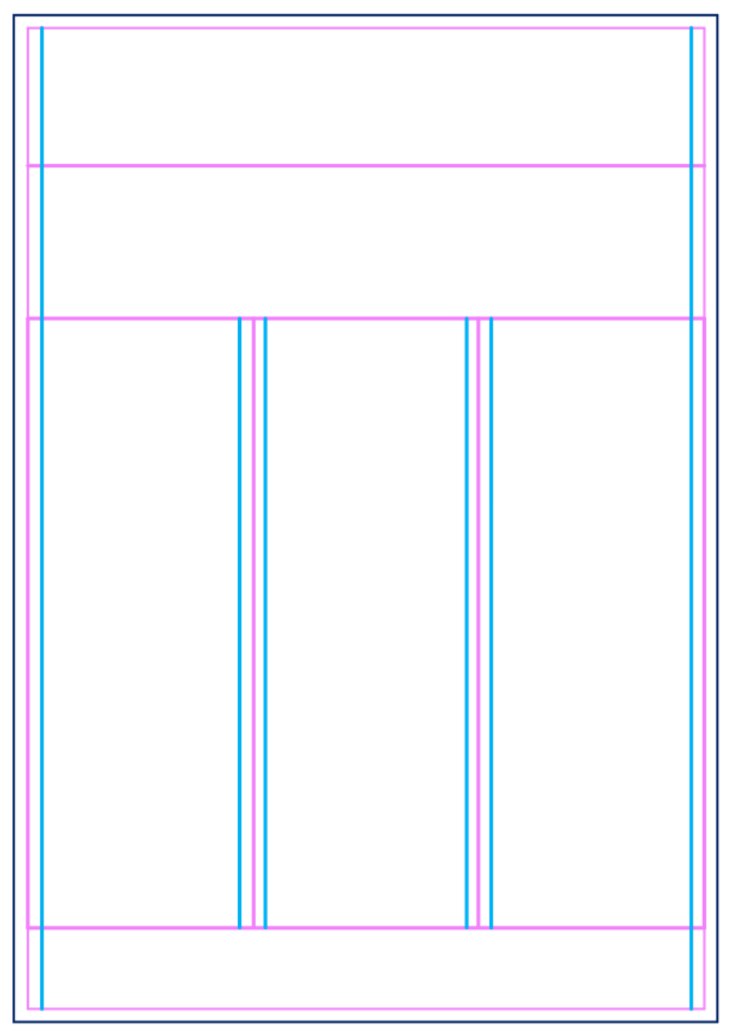
- Grid System & Alignment: Unless when having a clear vision for the design of the poster, Edwards proposes using a grid system. For an illustration refer to Figure 2. This establishes a clear visual structure and ensures consistent alignment of elements. He shows how to create and effectively utilize grids within PowerPoint. If possible, one should try aligning as many elements as possible even when not directly related, creating a subtle sense of structure and professionalism often employed instinctively by experienced graphic designers. As seen in Figure 3 this may even include redesigning some of the plots.
- Visual Hierarchy: Edwards discusses techniques for creating visual hierarchy through strategic use of font sizes, weights, colours, and placement. This guides the viewer's eye through the poster, highlighting the most important information and ensuring a clear flow of content. He warns against trying to emphasize everything, as this dilutes the impact and makes it difficult for viewers to discern the key takeaways. One should keep the Gutenberg Principle in mind, which dictates that the viewer reading direction goes left to right and top to bottom.
Design
After finishing the text and layout, one can start adding the one to the other and adding design elements that support the overall message of the poster and tie everything together. Edwards shares multiple tips to create a strong design without having to be an expert.
- PowerPoint as a Design Tool: He advocates for using PowerPoint, particularly newer versions, as a surprisingly powerful and readily accessible design tool for creating professional-looking posters. During the presentation, he showcases various techniques within PowerPoint, including manipulating text, images, and creating textured background boxes to seamlessly integrate images and graphics.
- Colour Selection: Edwards discusses colour theory principles, such as using complementary colours, tonal variations, and considering the psychological associations of different colours. He emphasizes using a limited colour palette and choosing colours strategically for emphasis and visual harmony. He recommends starting with the colours from any provided university template to maintain branding consistency. In order to ensure consistent colour usage with any template or university logo, he encourages using the eyedropper tool to pick accurate colours. Furthermore, he demonstrates how to create families of harmonizing colours, by changing only one of the value, saturation or hue of one base colour. This ensures, that the colours keep a relationship to each other.
- Image Selection: He emphasizes the importance of selecting high-quality, relevant images that directly supports the research and key message. He warns against using decorative or irrelevant images that distract from the core content. He also discusses practical considerations, such as image resolution, copyright permissions, and the potential use of AI image generation tools.
- Typography: Edwards highlights the importance of typography in conveying tone and professionalism. He advises against using decorative or unprofessional fonts like Comic Sans and demonstrates how block-justified text can sometimes create unsightly gaps, recommending left-aligned text for cleaner presentation in certain situations. He advises keeping body text at a minimum of 12pt in A4 format (scaling proportionally for larger poster sizes) for readability. He also cautions against excessive hyphenation, suggesting rewriting text where possible to avoid awkward line breaks.
- Title Block: The title block should catch the attention toward the relevant things and for the right reason. Eye catching colours or fitting background images can be used to achieve this. The title should attempt to use everyday language.
Conclusion
Edwards's overall approach is highly practical and emphasizes a "less is more" philosophy. He encourages researchers to be ruthless in their editing, prioritizing clarity, conciseness, and visual impact over excessive detail. His methodology, combining a clear framework with a rich array of practical strategies and techniques, empowers researchers to create posters that are not merely visually appealing but also highly effective communication tools. He underscores that by embracing a communication-centric mindset, researchers can significantly enhance the impact and reach of their scientific work.
Additional References
- Reynolds, G. (2012). Presentation Zen: Simple Ideas on Presentation Design and Delivery (2nd Edition). New Riders.
Figures