Hasso-Plattner-Institut
Prof. Dr. Tilmann Rabl
 

Summary of Good Graphs and Graphics

Summary written by Ronja Wagner, Julius Porbeck and SaadBin Khalid

As computer scientists, many of our projects tend to amass large amounts of data that begs to be plotted and put into diagrams. No matter if it's for a poster, a seminar presentation or an honest-to-god research paper, we want to show off all the beautiful data and evidence that we gathered. But how do we ensure that our graphs are not only pretty decorations? How do we instead use them to clearly communicate the message we want to convey in our research? And which common pitfalls usually stop us from reaching our communication goal? These questions and more were answered in Prof. Bolsover's lecture "Visualizing Data – Graphs and Graphics".

The Speaker – Gillian Bolsover

Prof. Bolsover leads the Digital Technology, Governance and Policy research group at HPI. In their research they focus on the analysis of computational propaganda and the effects of bots, algorithms, disinformation and other forms of political opinion manipulation on politics and society, as well as the changing nature of politics and citizenship in the digital age. For more information, see https://hpi.de/bolsover/profile/gillian-bolsover.html.

The Power and Pitfalls of Visuals in Communication

Data visualization starts with a clear understanding of what you want to communicate. Without this clarity, even the most polished graphics can mislead, confuse, or fail to convey their intended message.

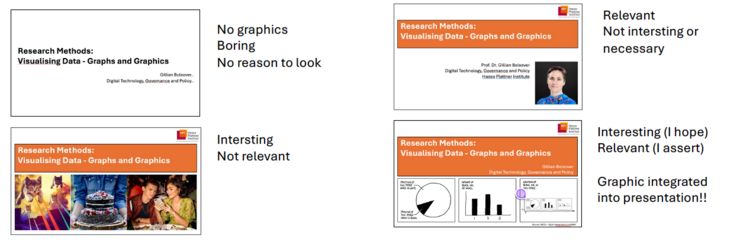
Too often, visuals are included merely to make the content appear more dynamic or aesthetically pleasing—sometimes simply "because they can" or because it is expected. Unfortunately, such visuals frequently lack meaningful relevance and, in many cases, do more harm than good, detracting from the clarity and impact of the content. By thoughtfully introducing and explaining the purpose of visuals within the content, we can ensure that they contribute effectively to the communication goal. Therefore, it is important to always keep the communication goal in mind. Figure 1.1 below demonstrates how effective visualizations must be engaging, relevant, and properly contextualized to achieve their full potential. Figure 1.2 shows an example of a graph where the communication goal was not clearly considered: Line graphs are best for visualising trends in your data, but there is no discernable trend in this graph, and the decision to have one line for each month makes it overwhelming and confusing. Being 100% clear about your communication goal beforehand – here it might be “The amount of trash removed from Lake Merritt decreased within the last 15 years” – is crucial to create meaningful graphs.

Figure 1.1 – Interesting and relevant graphics following the example of a presentation’s title slide Figure

1.2 – A graph without a clear message.

Graphs and Graphics

So far, we talked about common traits and advantages of visualization, often broadly referred to as graphs and graphics. However, in the following sections, we aim to differentiate between these two terms to provide clarity. Figure 2 illustrates the relationship between the terms and showcases some examples of graphic types to help contextualize this distinction.

Graphics encompass any visual element used to enhance or convey a message. These include photos, tables, flowcharts, diagrams, logos, and similar visual aids. Graphics complement the text by providing context, organizing information, or improving aesthetic appeal.

Graphs are a type of graphic that represents data. Their primary function is to communicate data-driven messages more effectively than raw data alone. Examples include line graphs, pie charts, bar graphs, histograms, and network graphs. Graphs help to identify trends, compare variables, or highlight patterns.

Example: In empirical research, data is typically presented using tables or graphics to organize information systematically. Graphs are then created to illustrate patterns or relationships, helping the reader to draw conclusions. For instance, a table might summarize survey results, while a graph highlights a trend, making the analysis more accessible.

Figure 2 – All graphs are graphics, but not every graphic is a graph.

In this summary, we mainly consider graphs specifically, since they tend to be more complicated, and affected by the most common mistakes – they also are especially relevant to us as computer scientists. Still, the same considerations also apply to graphics in general.

Key Considerations for Effective Communication

With this general knowledge about graphs and graphics, we can now discuss the nuances of when and how to use them. Two of the key factors for deciding what and how to visualize are the Communication Goal and the Type of Data:

→ Communication Goal

As mentioned, when choosing a graphic, the first thing to consider should always be on what you want to communicate. Consider what message you want to get across to your audience in general, and what the graph you want to add should communicate to support that main message. The message you want to convey is the foundation for all other decisions about the graphic, since it impacts aspects like choosing which data you want to display and therefore which graph type you use.

When considering your communication goals, always keep your target audience in mind. At the very least, you should be able to answer these two questions:

  • 1. Who is the target audience? and
  • 2. What is the audience’s general knowledge of the topic?

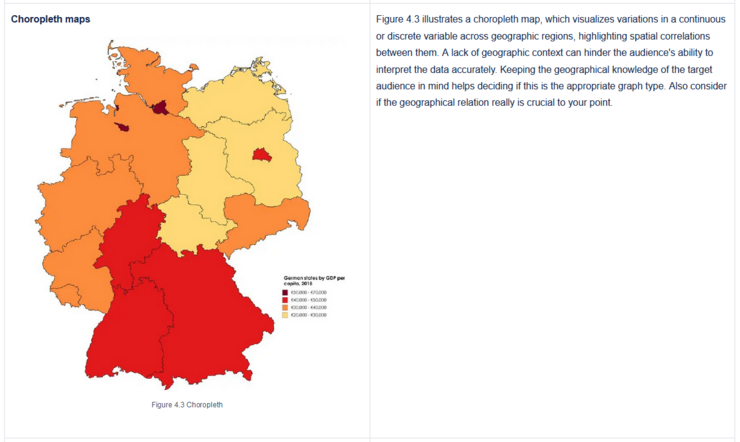
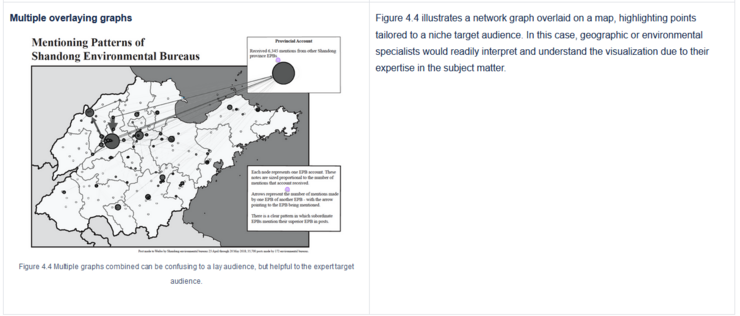
For example, if your audience lacks subject knowledge, you may need to provide a more detailed explanation of the results and the context for your graphic. Similarly, your choice of graphic should align with your audience’s level of understanding to ensure the message is delivered effectively. Advanced graph types are especially affected by this, since they tend to be more complex and require more prerequisite knowledge to understand. For instance, map graphs require an audience with a solid grasp of geographical displays, such as maps and regional areas, to fully comprehend the data.

→ Types of data

The type of data being displayed plays an important role in selecting the appropriate visualization. To determine which graph is most suitable for the given data type, it is essential to understand how data can be classified. Broadly, data can be categorized into:

  • 1. Qualitative (Categorical) Data: Descriptive data that categorizes or labels attributes:
    • Nominal: Data with no inherent order (e.g., colors, names, categories, cities).
    • Ordinal: Data with a meaningful order but no consistent scale (e.g., rankings, satisfaction levels).
  • 2. Quantitative Data: Numerical data that measures quantities or values:
    • Discrete: Data with distinct, countable values (e.g., number of students, items sold).
    • Continuous: Data with infinite possible values within a range (e.g., height, temperature).

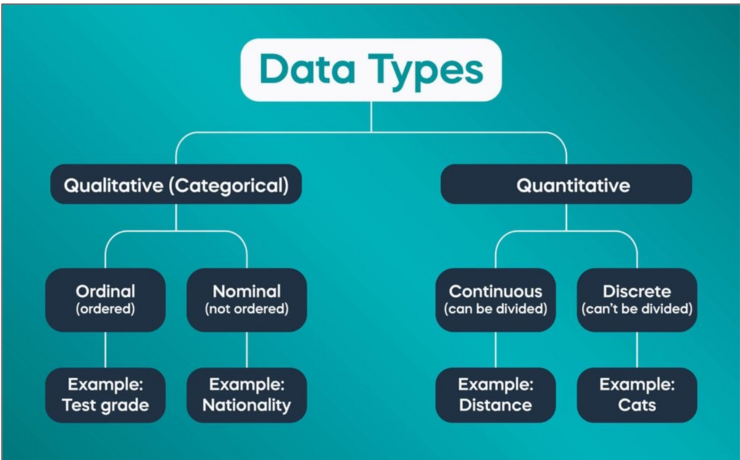
Figure 3 shows how these data types relate to each other and presents further examples for each category.

Figure 3 – Some data types and corresponding examples.

Different types of data require distinct representation to ensure the message can be clearly communicated. Misrepresenting data can lead to confusion or misinterpretation, ultimately undermining the effectiveness of the visualization. In the next section, we want to show which graph type is appropriate for which data type.

Choosing the Right Graph: A Guide to Data Visualization

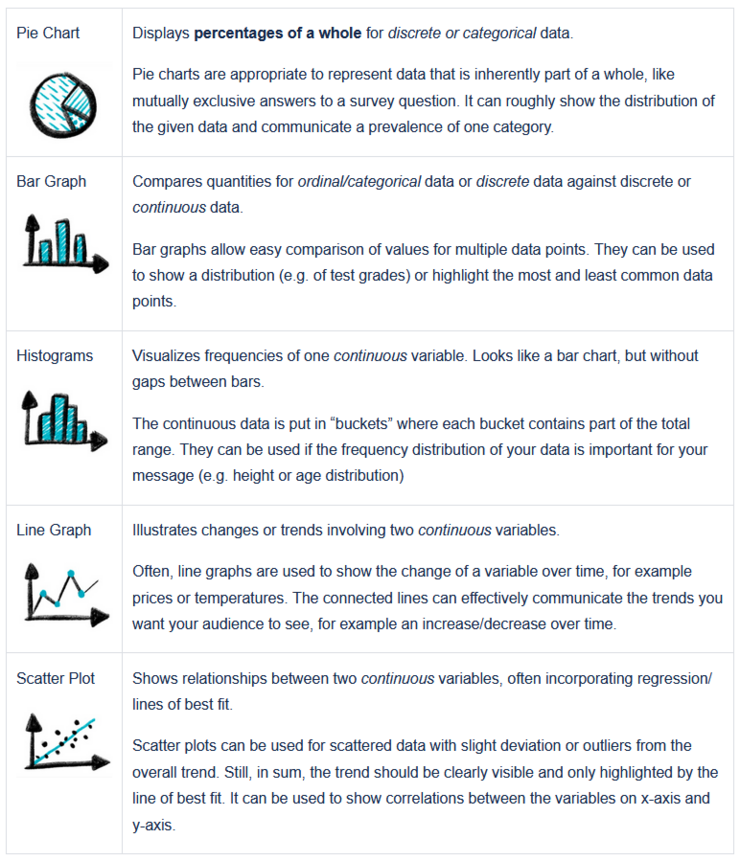
The following table 1 summarizes which type of graph is best suited for the mentioned data types and corresponding messages:

Table 1: Graphs & Datatypes

Advanced Graph Types

Advanced graph types are used to display more complex data relationships and patterns which cannot be reflected in simpler graph types like a bar charts, line graphs or histograms. As shown in Table 1, advanced graph types can be useful for visual representations for data that can be particularly valuable in specific contexts, some examples can be network diagrams, map graphs and stacked graphs.

However, these advanced graph types often come with their own pitfalls, particularly in terms of complexity and readability. They bear the risk of easily misleading the audience, or failing to communicate the core message to the target audience.

Carefully considering whether an advanced graph type is truly necessary can help avoiding these pitfalls – sometimes a less “fancy” alternative communicates your point better. Since advanced graph types potentially require more extensive background knowledge, considering the target audience plays an even bigger role here.

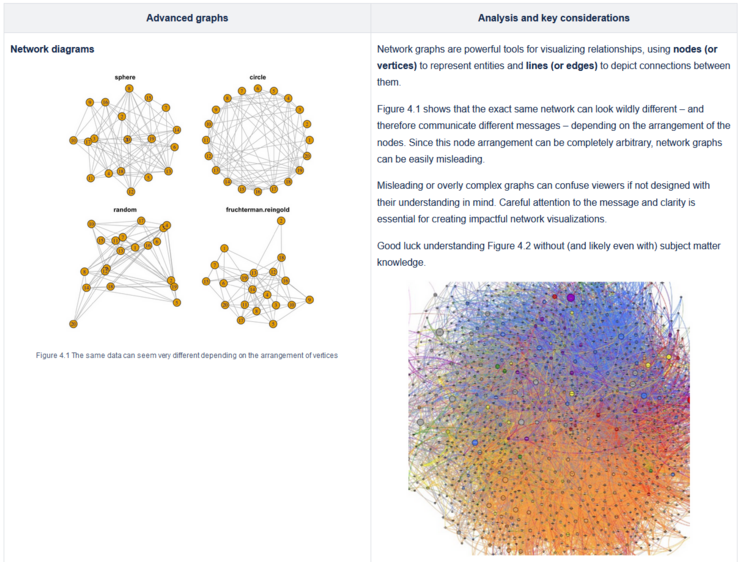
If in doubt, sticking to simpler graph types is often the more effective choice. Let's review some examples of advanced graph types in Table 2.

Table 2: Advanced Graphs

Common Pitfalls #BadGraphs

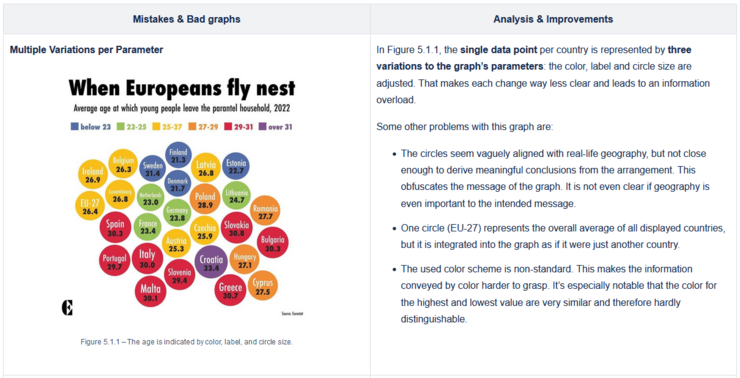
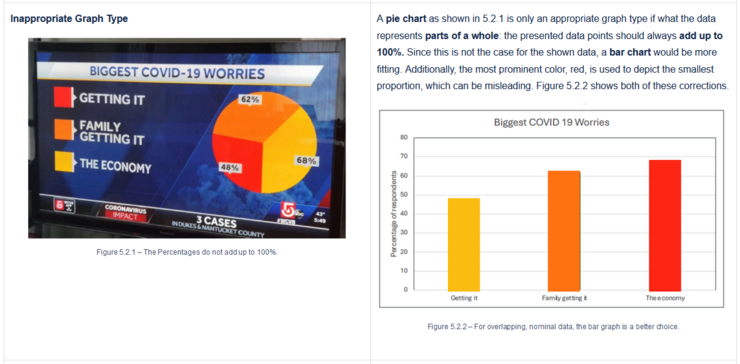
To gain a better understanding of which common graph mistakes to avoid and what the consequences of choosing an inappropriate graph type can be, we now want to have a closer look at some bad examples.

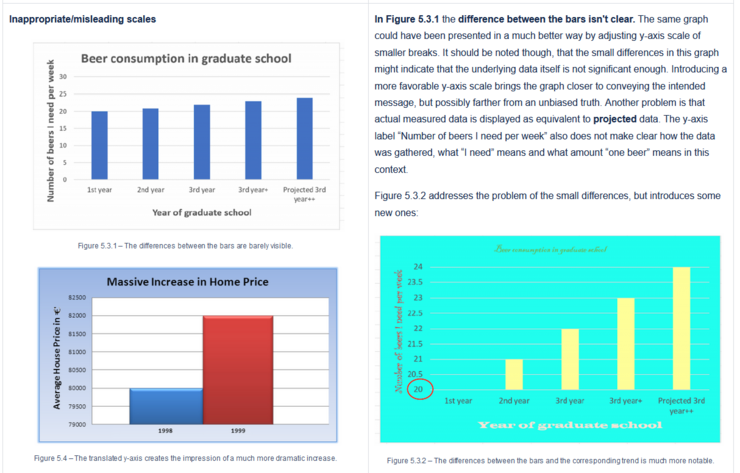
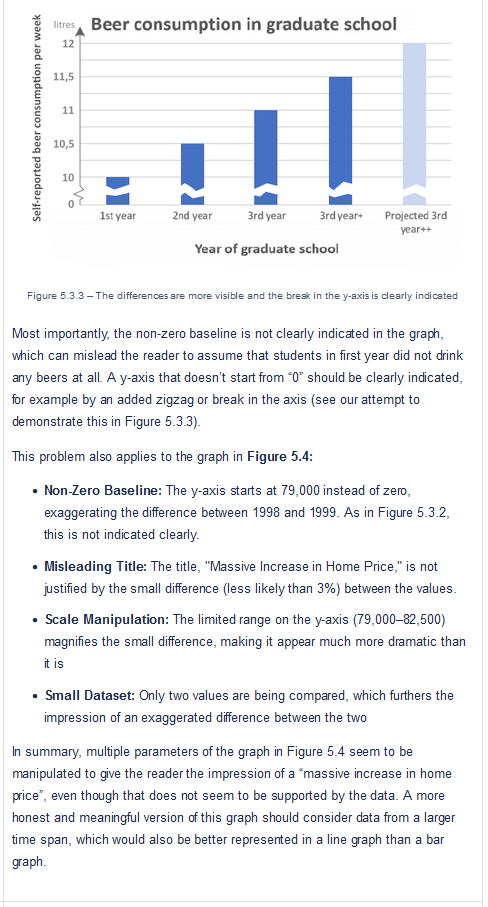
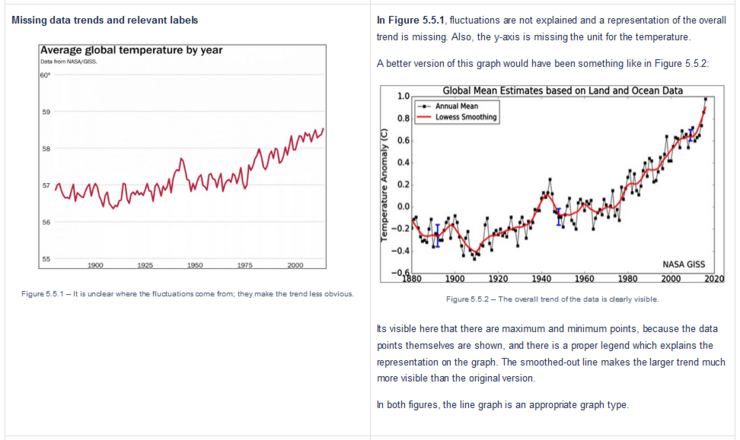
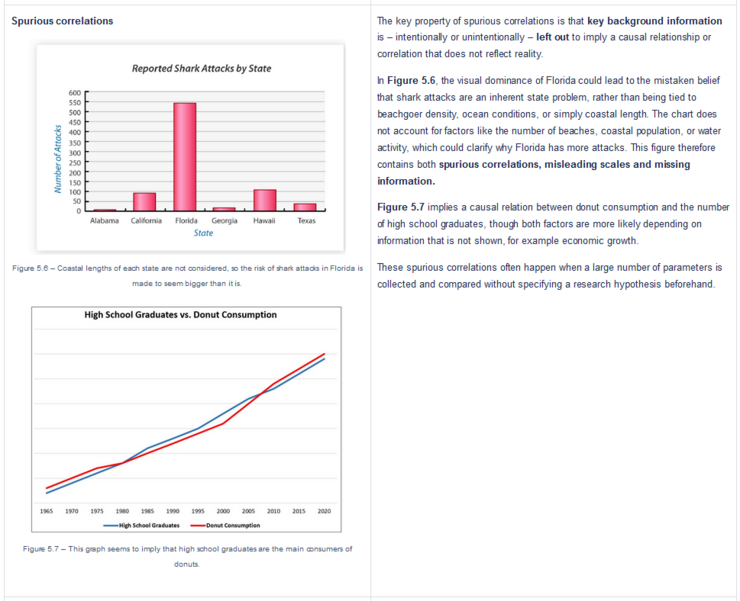
The table below provides examples of bad and misleading graphs, along with a critical analysis of their shortcomings. This serves as a guide to recognize and avoid these pitfalls.

Table 3: Bad Graphs #Don’ts

From the examples in Table 3(#Don’ts), we can summarize five key factors that are commonly found in poor or misleading visualizations:

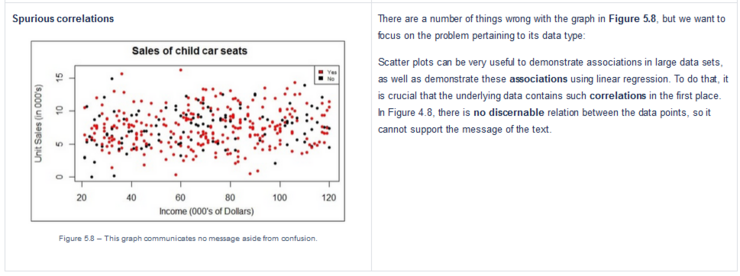
  1. No clear message – A graph should always communicate a message. Graphs without a clear message can not meaningfully support the rest of the text.
  2. Inappropriate graph type – The data type does not match the graph type and is therefore misrepresented. This can often contribute to above mentioned point #1.
  3. Misleading Scales – Inappropriate use of axes or inconsistent scaling distorts the message.
  4. Missing Relevant Data – Omitting critical data points creates an incomplete or skewed picture.
  5. Spurious Correlations – Displaying relationships between unrelated variables leads to false or exaggerated conclusions.

The analysis in Table 3(#Don’ts) demonstrates how easy it is to mislead or create poor visualizations. Often, a single graph can contain one or multiple factors that contribute to its misleading nature.

It should also be noted that it is not the reader’s responsibility to put endless effort in deciphering the message of a graph – the creator of the graph should ensure that their message is conveyed clearly and is immediately understandable.

Good Graph’s Requirements

For a graph to effectively communicate its message, it needs to provide the reader with sufficient information to interpret the presented data. This information includes:

  1. Clear Title: Provide a concise, descriptive title to convey the graph's purpose. This helps the reader to immediately put the graph into the right context and improves understanding of the graph’s message.
  2. Scaled Axes: Use appropriately scaled axes to reflect the data range. Trends in your data should be clearly visible and understandable on the chosen scale.
  3. Labeled Axes: Clearly labeled axes and data points to aid interpretation. Since the message of a graph will often be about some kind of correlation between the factors on the x-axis and y-axis, the reader needs to clearly see what data is represented there.
  4. Units of Measurement: Specify units to provide context for the data.
  5. Relevant Context: Include information that improves understanding. This also includes referencing the graph in the text so the context is clear.
  6. Data Accuracy and Reliability: To effectively communicate your message to the target audience you can increase their trust by providing the source of the data.

In Figure 6, a clear title, an appropriately scaled axes with labels and units, relevant information, and accurate data points are being used to communicate the message that a ball bounces about half as high as the height it is dropped from. The text it is integrated in should provide background information (e.g. the kind of ball that was used) and also make clear how the information provided in the graph is relevant to the overall point of the text.

Figure 6 – Elements of a good graph.

Depending on the type of data and graph, additional – or fewer – elements may be required. For instance, a legend is necessary when presenting multiple datasets, and the total sample size (N) is particularly important for pie charts.

Also note that the graph and its caption should contain enough information for it to be readable on its own without the surrounding text, though of course the general context can be assumed to be known.

If applicable, consider including details such as the data source, explanatory notes, and thoughtful use of colors and shapes.

Good Graphic Checklist - #goodGraphicCheckList

Complementary to graphs, including visuals like images or tables in your work can also enhance clarity — if done thoughtfully. A structured approach ensures that these visuals are effective and aligned with your goals. The checklist below offers a straightforward requirements checklist to help you evaluate if the reader is provided all information necessary to evaluate and understand the figure and its goal.

Table 4: Checklist for basic graphic types

ImagesTables
Title and number: Provide a clear title and number to identify the image.Title and number: Assign a descriptive title and unique number for easy reference.
Caption: Include a caption that explains the image’s content.Clear dataset: Ensure the dataset is well-organized, with all units labeled for rows, columns, and subcategories.
Source: Clearly state who created or provided the image.Reference in the text: Cite the table in your text to integrate it into your narrative.
Reference in the text: Mention the image directly in the text to connect it to your content. 

Steps to Create a Good Graphic - #5StepToGoodGraph

Despite all the discussed pitfalls, creating an effective graphic is simpler than it may seem. The worst pitfalls and most common mistakes can be avoided by always keeping in mind which message you want to communicate and basing all your following choices on said message. Specifically, you can use the following five overarching steps as a guide to ensure clarity and accuracy in your data visualisations, no matter if you want to use graphs, images or tables. These steps not only help avoid common mistakes but actively empower you to communicate effectively.

  • 1. Be 100% clear on the overall communication goal.
  • 2. Be 100% clear on what the Graph/Graphic is communicating.
  • 3. Based on the message select the most appropriate Graphic type and given data.
  • 4. Design the Graphic to clearly communicate the message.
  • 5. Integrate the Graphic in your text/presentation.

Let's break them down:

It’s crucial to first establish clarity about the overall message we aim to communicate (Step #1). Once we have a clear understanding of the topic, we can move to the next step, where we define the specific goal of the graphic—what exactly it is intended to communicate (Step #2). These first two steps are the most crucial ones, but also the easiest ones to miss – so make sure you consider them when creating your next graphic!

The choice of the graphic type depends on both the nature of the data and the message we want to convey (Step #3). Based on the data, we then select the most suitable type of graph or graphic and proceed to create it, ensuring that it effectively communicates the intended message (Step #4).

The final step is integrating the graphic into the content (Step #5). This involves referencing the graphic within the content in a way that clearly explains its purpose and communicates the intended message seamlessly.

While explanatory context can make a graphic easier to understand, the ultimate goal is to create a meaningful and well-designed graphic that speaks for itself.

Conclusion

Graphs and graphics should not be created simply for the sake of it (see Table 3: #Don’ts). Their creation must be driven by a clear purpose, the data's context, and the need to effectively communicate the message visually.

Poorly designed graphics are common but avoidable by always keeping your communication goal in mind and adhering to the #5stepToGoodGraph checklist and Table 4: Checklist for Good Graphic Types. These guidelines help to improve data visualization skills and ensure a meaningful presentation of findings.

Understanding common pitfalls like misleading scales or spurious correlations can improve mindfulness about manipulation or misrepresentation when creating or interpreting graphics.

If you want to see more…

Information Is Beautiful is a renowned platform specializing in data visualization and information design. It provides visually appealing and insightful representations of complex data, serving as an excellent example of how effectively design can communicate information. So if you need inspiration for your next graphic, or if you just want to look at beautiful data, check it out!

Sources

Figure 0, Figure 2, Figure 7 and the images in Table 1 were drawn by the creators of this summary. All other images are taken from Prof. Bolsover's presentation that this summary is based on, though Figure 5.3.3 was modified by us and on Figure 1.2 to increase visibility we have adjusted the contrast and perspective of the image.

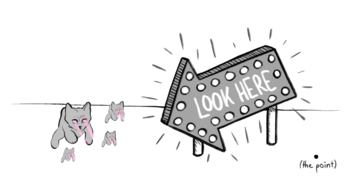
Figure 7 – Bad graphics distract or even detract from the point you want to make. Unless your point is laser-eyed cats.